0%

需求

办公使用,常用软件:微信、钉钉、QQ、office、几何画板、录屏软件、pdf、视频、音乐

型号 价格
CPU AMD 锐龙3 2200G(盒装) 599
主板 华擎 A320 359
内存条 海盗船 DDR4 3200 258
固态硬盘 三星 970 EVO Plus 250G 479
硬盘 西部数据 蓝盘 1T 299
机箱 先马 黑洞 289
电源 长城HOPE-6000DS 269
散热器 盒装自带幽灵散热器
显卡
显示器 Philip 243S7EHMB 799
鼠标键盘 罗技(Logitech)MK275 95
无线网卡 TP-LINK TL-WN725N 51
总价 3270

软件

  • office

  • Snipaste

  • Listary

  • Everything

  • SpaceSniffer

  • fences

  • Bandizip

  • Potplayer

grep

global search regular expression(RE) and print out the line

基于正则表达式查找满足条件的行

grep 语法

1
2
3
4
5
6
7
grep pattern file
grep -i pattern file #忽略大小写
grep -v pattern file #不显示匹配的行
grep -o pattern file #把每个匹配的内容用独立的行显示
grep -E pattern file #使用扩展正则表达式
grep -A -B -C pattern file #打印命中数据的上下文
grep pattern -r dir / #递归搜索

awk

名字来源于三个作者的名字简称

根据定位到的数据行处理其中的分段

awk 语法

1
2
3
4
5
6
7
awk 'pattern{action}'
awk 'BEGIN{}END{}' #开始和结束
awk '/Running/' #正则匹配
awk '/aa/,/bb/' #区间选择
awk '$2~/xxx/' #字段匹配
awk 'NR==2' #取第二行
awk 'NR>1' #去掉第一行

sed

steam editor

根据定位到的数据行修改数据

sed 语法

1
2
3
4
5
6
7
sed [addr]X[options]
-e 表达式
sed -n '2p' #打印第二行
sed 's#hello#world#' #修改
-i #直接修改源文件
-E #扩展表达式
--debug #调试

模糊查询

mongoDB 支持正则表达式

1
db.products.find( { sku: { $regex: /789$/ } } )
1
SELECT * FROM products WHERE sku like "%789";

排序

1
{ $sort: { <field1>: <sort order>, <field2>: <sort order> ... } }
  • 1 to specify ascending order. 顺序
  • -1 to specify descending order. 倒序

示例:

1
2
3
4
5
db.users.aggregate(
[
{ $sort : { age : -1, posts: 1 } }
]
)

分页

1
db.COLLECTION_NAME.find().limit(NUMBER).skip()

Comparison Query Operators

Name Description
$eq Matches values that are equal to a specified value.
$gt Matches values that are greater than a specified value.
$gte Matches values that are greater than or equal to a specified value.
$in Matches any of the values specified in an array.
$lt Matches values that are less than a specified value.
$lte Matches values that are less than or equal to a specified value.
$ne Matches all values that are not equal to a specified value.
$nin Matches none of the values specified in an array.

Logical Query Operators

Name Description
$and Joins query clauses with a logical AND returns all documents that match the conditions of both clauses.
$not Inverts the effect of a query expression and returns documents that do not match the query expression.
$nor Joins query clauses with a logical NOR returns all documents that fail to match both clauses.
$or Joins query clauses with a logical OR returns all documents that match the conditions of either clause.

Element Query Operators

Name Description
$exists Matches documents that have the specified field.
$type Selects documents if a field is of the specified type.

Evaluation Query Operators

Name Description
$expr Allows use of aggregation expressions within the query language.
$jsonSchema Validate documents against the given JSON Schema.
$mod Performs a modulo operation on the value of a field and selects documents with a specified result.
$regex Selects documents where values match a specified regular expression.
$text Performs text search.
$where Matches documents that satisfy a JavaScript expression.

Geospatial Query Operators

Query Selectors

Name Description
$geoIntersects Selects geometries that intersect with a GeoJSON geometry. The 2dsphere index supports $geoIntersects.
$geoWithin Selects geometries within a bounding GeoJSON geometry. The 2dsphere and 2d indexes support $geoWithin.
$near Returns geospatial objects in proximity to a point. Requires a geospatial index. The 2dsphere and 2d indexes support $near.
$nearSphere Returns geospatial objects in proximity to a point on a sphere. Requires a geospatial index. The 2dsphere and 2d indexes support $nearSphere.

Geometry Specifiers

Name Description
$box Specifies a rectangular box using legacy coordinate pairs for $geoWithin queries. The 2d index supports $box.
$center Specifies a circle using legacy coordinate pairs to $geoWithin queries when using planar geometry. The 2d index supports $center.
$centerSphere Specifies a circle using either legacy coordinate pairs or GeoJSON format for $geoWithin queries when using spherical geometry. The 2dsphere and 2d indexes support $centerSphere.
$geometry Specifies a geometry in GeoJSON format to geospatial query operators.
$maxDistance Specifies a maximum distance to limit the results of $near and $nearSphere queries. The 2dsphere and 2d indexes support $maxDistance.
$minDistance Specifies a minimum distance to limit the results of $near and $nearSphere queries. For use with 2dsphere index only.
$polygon Specifies a polygon to using legacy coordinate pairs for $geoWithin queries. The 2d index supports $center.
$uniqueDocs Deprecated. Modifies a $geoWithin and $near queries to ensure that even if a document matches the query multiple times, the query returns the document once.

Array Query Operators

Name Description
$all Matches arrays that contain all elements specified in the query.
$elemMatch Selects documents if element in the array field matches all the specified $elemMatch conditions.
$size Selects documents if the array field is a specified size.

Bitwise Query Operators

Name Description
$bitsAllClear Matches numeric or binary values in which a set of bit positions all have a value of 0.
$bitsAllSet Matches numeric or binary values in which a set of bit positions all have a value of 1.
$bitsAnyClear Matches numeric or binary values in which any bit from a set of bit positions has a value of 0.
$bitsAnySet Matches numeric or binary values in which any bit from a set of bit positions has a value of 1.

问题

Windows Server 2016 下以startup.bat 方式启动比在Windows Server 2012 下执行JAVA程序速度慢很多。

解决方案

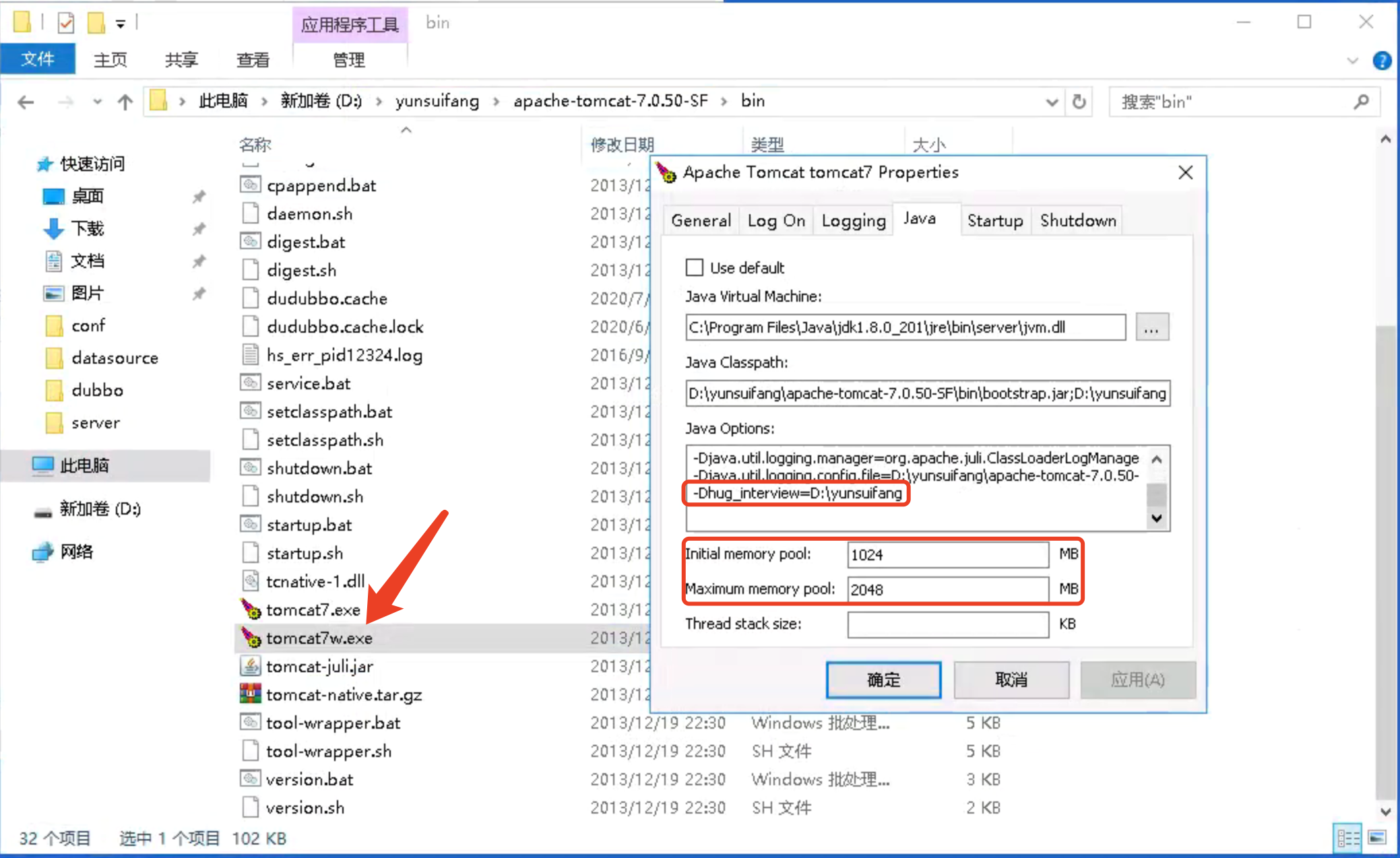
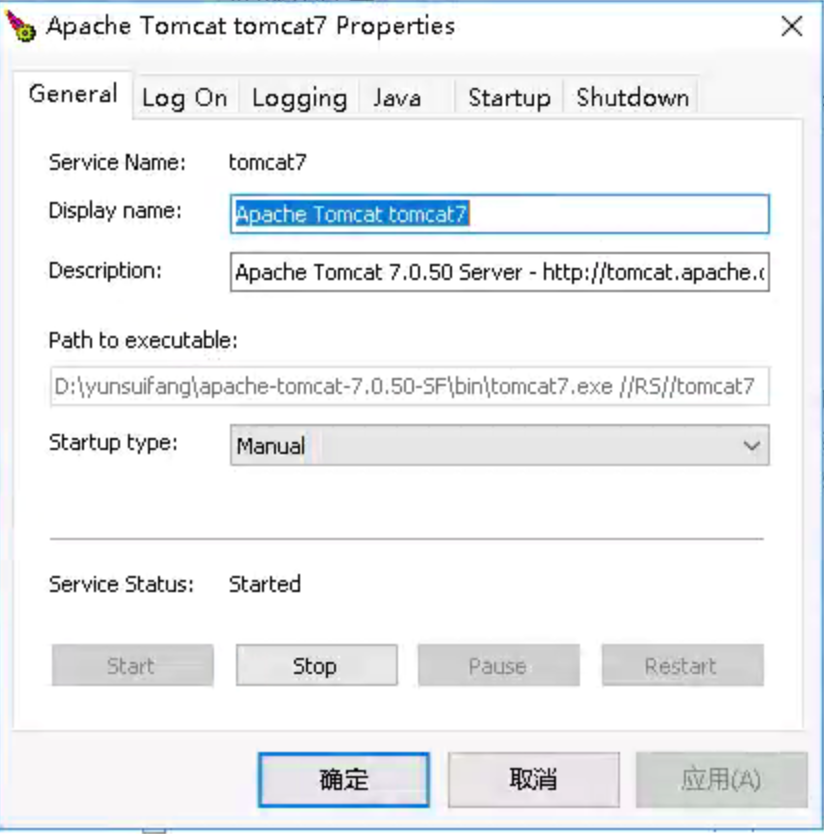
将tomcat注册成为服务,到tomcat/bin路径下执行

1
service.bat install tomcat7

在服务中启动tomcat,速度就明显上去了。

环境变量:

ayeCuAZ9TsvOxhH

另外备注:而且点击tomcat控制台会让程序终端 中止,ctrl+c会让程序继续运行

1
2
#从服务列表中移除
service.bat remove tomcat7

启动、停用tomcat

3kCIWZvYsl6SaG7

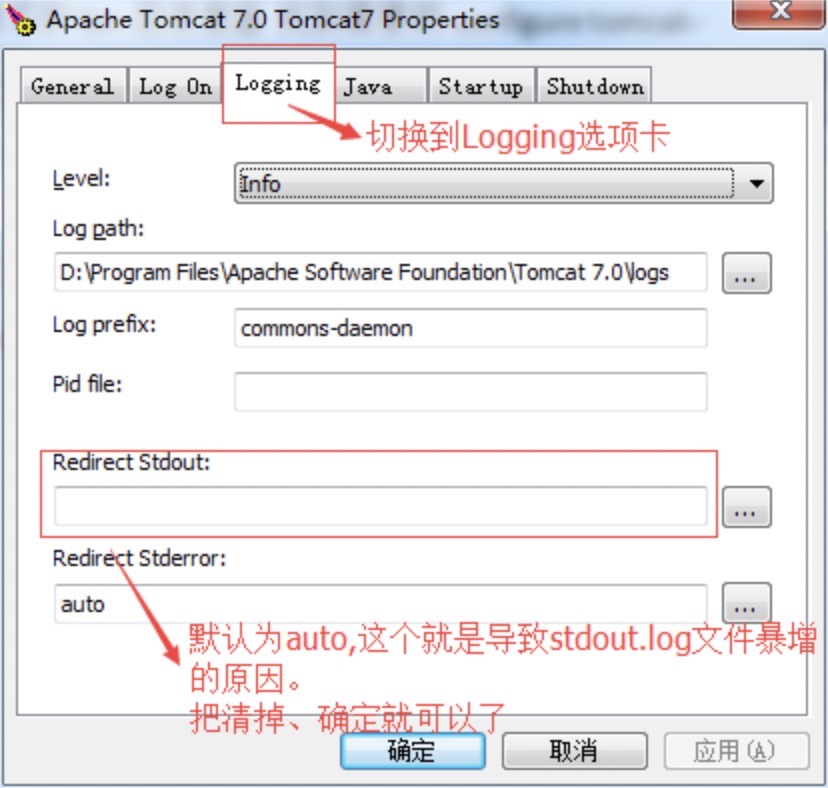
stdout.log日志暴增

qo7CGA6mwuOXZFs